Introduction
What do you do when a single piece of land can be rightfully claimed by two different locations?
It’s not that unusual for one place to be two places. For example, the Claire’s in your nearby mall. Is that in the Claire’s? Is that in the mall? Really, it’s in both.
SafeGraph addresses this problem using the concept of parent and child locations. Some overarching location that contains many other locations within it is a parent. Common types of parents include malls, airports, and shopping centers. You can see the full list of location types that can be parents, and some more information about parent/child relationships, here. The location that’s inside of some sort of parent is a child.
Dealing with parent and child locations can be an important part of working with SafeGraph data, even if you’re not interested in distinguishing them, since if you’re not careful you could end up double-counting foot traffic: once for the parent, and once for the child.
So some important questions:
- How can we look in our data and figure out where we have parent and child locations?
- How can we work with data that has parent and child locations?
- How can we think about the spatial orientation of parent and child locations?
Let’s start by opening up our data and loading it in.
| customer_placekey | customer_parent_placekey | customer_location_name | placekey | |
|---|---|---|---|---|
| 1 | zzw-222@64h-vr7-ysq | 222-226@64h-vr7-ysq | Sharps Barbershop | 222-226@64h-vr7-ysq |
| 2 | zzy-222@64h-vr7-ysq | 222-226@64h-vr7-ysq | Cajun Seafood & Wings | 222-226@64h-vr7-ysq |
| 3 | 222-226@64h-vr7-ysq | NaN | Pleasant Valley Marketplace | 222-226@64h-vr7-ysq |
| 4 | zzw-223@64h-vr7-ysq | 222-226@64h-vr7-ysq | Mamma Mia Pizzeria | 222-226@64h-vr7-ysq |
| 5 | 22p-222@64h-vr7-y35 | 222-226@64h-vr7-ysq | Kingdom World Outreach Center | 222-226@64h-vr7-ysq |
| 6 | 22f-222@64h-vr7-yvz | 222-226@64h-vr7-ysq | Saigon 1 | 222-226@64h-vr7-ysq |
| 7 | 22g-222@64h-vr7-yvz | 222-226@64h-vr7-ysq | DHL | 222-226@64h-vr7-ysq |
| 8 | zzw-224@64h-vr7-y35 | 222-226@64h-vr7-ysq | Sally’s Bakery & Grocery | 222-226@64h-vr7-ysq |
| 9 | 22r-222@64h-vr7-9j9 | 222-226@64h-vr7-ysq | Smoke Shack | 222-226@64h-vr7-ysq |
This sample contains a set of customer_ columns of the child data used to match, and then another set of columns containing the match data, i.e. the parent.
Store data that was acquired in a different way, for example getting all POIs in a certain city, might be structured slightly differently, so the next steps might not be necessary for you.
So, question 1 as above:
1. How can we look in our data and figure out where we have parent and child locations?
We’ve got the data. We separated out all the match data, but for a given set of POIs that contains both parents and children, we can figure out where we have parent and child locations by looking at the parent_placekey column. This column is missing for any location without a parent. For children locations, it will tell you which location is the parent.
We can figure out children by any row that has a nonmissing parent_placekey column.
And we can figure out parents by *row for which its placekey is found as a parent_placekey of some other column.
Let’s find this in our data here:
| customer_placekey | customer_parent_placekey | customer_location_name | placekey | |
|---|---|---|---|---|
| 1 | zzw-222@64h-vr7-ysq | 222-226@64h-vr7-ysq | Sharps Barbershop | 222-226@64h-vr7-ysq |
| 2 | zzy-222@64h-vr7-ysq | 222-226@64h-vr7-ysq | Cajun Seafood & Wings | 222-226@64h-vr7-ysq |
| 3 | 222-226@64h-vr7-ysq | NaN | Pleasant Valley Marketplace | 222-226@64h-vr7-ysq |
| 4 | zzw-223@64h-vr7-ysq | 222-226@64h-vr7-ysq | Mamma Mia Pizzeria | 222-226@64h-vr7-ysq |
| 5 | 22p-222@64h-vr7-y35 | 222-226@64h-vr7-ysq | Kingdom World Outreach Center | 222-226@64h-vr7-ysq |
| 6 | 22f-222@64h-vr7-yvz | 222-226@64h-vr7-ysq | Saigon 1 | 222-226@64h-vr7-ysq |
| 7 | 22g-222@64h-vr7-yvz | 222-226@64h-vr7-ysq | DHL | 222-226@64h-vr7-ysq |
| 8 | zzw-224@64h-vr7-y35 | 222-226@64h-vr7-ysq | Sally’s Bakery & Grocery | 222-226@64h-vr7-ysq |
| 9 | 22r-222@64h-vr7-9j9 | 222-226@64h-vr7-ysq | Smoke Shack | 222-226@64h-vr7-ysq |
Now it just so happens that the data we’ve taken for this demonstration includes exactly one parent: the Pleasant Valley Marketplace in Virginia Beach, and all of its children.
With our data loaded, and the parents and children identified, we can move on to our next question:
2. How can we work with data that has parent and child locations?
This requires us to think about what kind of parent/child relationship we have. The most important distinction is whether or not the child is enclosed within its parent.
The enclosed column tells you whether a child is enclosed within its parent. This is something like that Claire’s in the mall. It’s really inside that mall, as opposed to a burger joint in an outdoor strip mall, which is in that strip mall but maybe also sort of its own space. When a location like Claire’s is enclosed, it can be difficult to tell the difference between a device being in Claire’s and being near Claire’s inside the mall.
The way we deal with parent and child locations differs considerably based on whether the children are enclosed or not.
In the case of Pleasant Valley Marketplace, the children are enclosed (enclosed == True).
Children that are enclosed (enclosed == True) are basically not distinguished from their parents. They do not have their own separate foot traffic data. Sometimes they have their own polygons, but sometimes they’re just a part of the parent polygon, although they may have their own latitude/longitude data.
Children that are not enclosed (enclosed == False) have parents but also act as independent locations. We track visitor data like visits_per_day separately for those locations, and they have their own polygon data in the polygon_wkt column.
The Pleasant Valley Marketplace is full of enclosed children, so we’ll talk about how to handle that first.
Working with Enclosed Children
How can we handle data from enclosed children? Well, we can ignore the children’s foot traffic data, since it doesn’t really have any. We can take the parent foot traffic data we see, and that covers the entire region.
| customer_placekey | customer_parent_placekey | customer_location_name | placekey | |
|---|---|---|---|---|
| 1 | zzw-222@64h-vr7-ysq | 222-226@64h-vr7-ysq | Sharps Barbershop | 222-226@64h-vr7-ysq |
| 2 | zzy-222@64h-vr7-ysq | 222-226@64h-vr7-ysq | Cajun Seafood & Wings | 222-226@64h-vr7-ysq |
| 3 | 222-226@64h-vr7-ysq | NaN | Pleasant Valley Marketplace | 222-226@64h-vr7-ysq |
| 4 | zzw-223@64h-vr7-ysq | 222-226@64h-vr7-ysq | Mamma Mia Pizzeria | 222-226@64h-vr7-ysq |
| 5 | 22p-222@64h-vr7-y35 | 222-226@64h-vr7-ysq | Kingdom World Outreach Center | 222-226@64h-vr7-ysq |
| 6 | 22f-222@64h-vr7-yvz | 222-226@64h-vr7-ysq | Saigon 1 | 222-226@64h-vr7-ysq |
| 7 | 22g-222@64h-vr7-yvz | 222-226@64h-vr7-ysq | DHL | 222-226@64h-vr7-ysq |
| 8 | zzw-224@64h-vr7-y35 | 222-226@64h-vr7-ysq | Sally’s Bakery & Grocery | 222-226@64h-vr7-ysq |
| 9 | 22r-222@64h-vr7-9j9 | 222-226@64h-vr7-ysq | Smoke Shack | 222-226@64h-vr7-ysq |
However, while we don’t have traffic data for the children, we do have plenty of other information about them from the core information columns.
| placekey | parent_placekey | location_name | |
|---|---|---|---|
| 0 | zzw-223@64h-vr7-y35 | 222-226@64h-vr7-ysq | Western Union |
| 1 | zzw-222@64h-vr7-ysq | 222-226@64h-vr7-ysq | Sharps Barbershop |
| 2 | zzy-222@64h-vr7-ysq | 222-226@64h-vr7-ysq | Cajun Seafood & Wings |
| 4 | zzw-223@64h-vr7-ysq | 222-226@64h-vr7-ysq | Mamma Mia Pizzeria |
| 5 | 22p-222@64h-vr7-y35 | 222-226@64h-vr7-ysq | Kingdom World Outreach Center |
| 6 | 22f-222@64h-vr7-yvz | 222-226@64h-vr7-ysq | Saigon 1 |
| 7 | 22g-222@64h-vr7-yvz | 222-226@64h-vr7-ysq | DHL |
| 8 | zzw-224@64h-vr7-y35 | 222-226@64h-vr7-ysq | Sally’s Bakery & Grocery |
| 9 | 22r-222@64h-vr7-9j9 | 222-226@64h-vr7-ysq | Smoke Shack |
| 10 | zzw-222@64h-vr7-y35 | 222-226@64h-vr7-ysq | Dolphin Laundromat |
| 11 | zzy-222@64h-vr7-yvz | 222-226@64h-vr7-ysq | State Farm |
| 12 | 222-222@64h-vr7-ysq | 222-226@64h-vr7-ysq | Krossroads Cafe and Tavern |
| 13 | 228-222@64h-vr7-yvz | 222-226@64h-vr7-ysq | Allstate Insurance |
| 14 | 22b-222@64h-vr7-ysq | 222-226@64h-vr7-ysq | Iglesia Cristiana Rios de Agua Viva de Virginia Beach |
| 15 | zzw-222@64h-vr7-yvz | 222-226@64h-vr7-ysq | Family Dollar Stores |
| 16 | 222-224@64h-vr7-ysq | 222-226@64h-vr7-ysq | Tung Hoi Chinese Restaurant |
| 17 | zzw-226@64h-vr7-y35 | 222-226@64h-vr7-ysq | Fj Beauty Studios |
| 18 | 22s-222@64h-vr7-y35 | 222-226@64h-vr7-ysq | Adamo’s New York Pizzeria |
| 19 | 222-223@64h-vr7-ysq | 222-226@64h-vr7-ysq | Food Lion |
| 20 | 22f-222@64h-vr7-ysq | 222-226@64h-vr7-ysq | Tokyo Express |
For example, maybe we’re interested in the kinds of businesses and locations that are inside the shopping center.
| Number | ||
|---|---|---|
| top_category | sub_category | |
| Activities Related to Credit Intermediation | Other Activities Related to Credit Intermediation | 1 |
| Agencies, Brokerages, and Other Insurance Related Activities | Insurance Agencies and Brokerages | 2 |
| Bakeries and Tortilla Manufacturing | Retail Bakeries | 1 |
| Couriers and Express Delivery Services | Couriers and Express Delivery Services | 1 |
| Drycleaning and Laundry Services | Drycleaning and Laundry Services (except Coin-Operated) | 1 |
| General Merchandise Stores, including Warehouse Clubs and Supercenters | All Other General Merchandise Stores | 1 |
| Grocery Stores | Supermarkets and Other Grocery (except Convenience) Stores | 1 |
| Other Miscellaneous Store Retailers | Tobacco Stores | 1 |
| Personal Care Services | Barber Shops | 1 |
| Beauty Salons | 1 | |
| Religious Organizations | Religious Organizations | 2 |
| Restaurants and Other Eating Places | Full-Service Restaurants | 7 |
3. How can we think about the spatial orientation of parent and child locations?
In the case of enclosed-children data where the children have their own polygons, you can handle spatial orientation as normal. Simply look at the polygons!
But what if they don’t, as in this data? At this point, you’re stuck with just the parent polygon. But you can still do a little something with the children, because they will have latitude and longitude data that you can work with.
So we’ll start by mapping out the parent polygon. The polygon_wkt column is information about the POI’s polygon in WKT format.
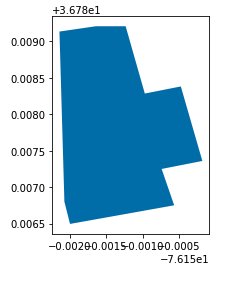
We can add the child locations on as points (see this guide).
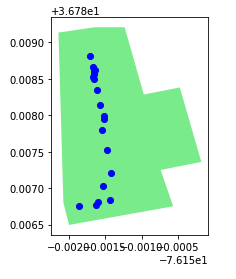
This looks like the kind of place where there’s a long row of stores down the center, surrounded by parking. Let’s make sure that makes sense. First of all… does the polygon include parking? We can check in the includes_parking_lot column.
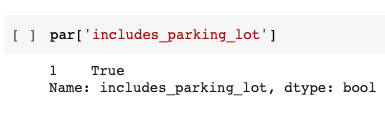
Yep! That’s a parking lot. Knowing that we have a parking lot is important for interpreting foot traffic data-for example, foot traffic to a McDonald’s means something very different depending on whether or not we pick up the drive-thru.
What is notable is that Pleasant Valley turns out to be an outdoor shopping center, which goes to show that sometimes these kinds of locations can also be “enclosed.”
Working with Non-Enclosed Children
Let’s look at another part of the data, picking out a parent location that has non-enclosed children. Unlike the first data set, this one was created by pulling all locations in a certain zip code. This means we can see, and understand how to import, this alternate structure of data.
This time we’ll be working with the Shoppes at Lac de Ville, which is in Rochester, New York. This is the Placekey ID 222-224@665-8rv-vs5, and so to get both the parent and child data, we can look for that code in either the parent_placekey column or the placekey column.
| placekey | parent_placekey | location_name | bucketed_dwell_times | |
|---|---|---|---|---|
| 43 | 222-224@665-8rv-vs5 | NaN | Shoppes At Lac De Ville | {“240”:177} |
| 56 | zzw-22b@665-8rv-sdv | 222-224@665-8rv-vs5 | Allstate Insurance | NaN |
| 59 | 224-222@665-8rv-vmk | 222-224@665-8rv-vs5 | Parker Robt E III DDS | {“240”:0} |
| 97 | zzw-223@665-8rv-sdv | 222-224@665-8rv-vs5 | Silk | {“240”:0} |
| 153 | 222-225@665-8rv-vs5 | 222-224@665-8rv-vs5 | Citizens Bank | {“240”:0} |
| 187 | 222-222@665-8rv-s89 | 222-224@665-8rv-vs5 | Ritz Stacey M Od | {“240”:5} |
| 224 | 224-222@665-8rv-vs5 | 222-224@665-8rv-vs5 | Mobile Notary Service | NaN |
| 227 | 229-222@665-8rv-vmk | 222-224@665-8rv-vs5 | Joseph I Mann MD Greater Rochester Neurology | {“240”:0} |
| 229 | zzw-228@665-8rv-sdv | 222-224@665-8rv-vs5 | Project Leannation | {“240”:0} |
| 283 | 223-222@665-8rv-vj9 | 222-224@665-8rv-vs5 | Visionary Eye Associates | {“240”:0} |
| 286 | 222-228@665-8rv-vs5 | 222-224@665-8rv-vs5 | Julian’s Dry Cleaners | NaN |
| 296 | 222-224@665-8rv-s89 | 222-224@665-8rv-vs5 | Rochester Eye Associates | NaN |
| 301 | zzw-227@665-8rv-sdv | 222-224@665-8rv-vs5 | Mesquite Grill | {“240”:11} |
| 395 | zzw-222@665-8rv-sdv | 222-224@665-8rv-vs5 | Dollar General | {“240”:28} |
| 396 | 222-229@665-8rv-vs5 | 222-224@665-8rv-vs5 | Bolsa Nails | {“240”:0} |
| 426 | zzw-229@665-8rv-sdv | 222-224@665-8rv-vs5 | Thimble Tailoring & Clothier | NaN |
| 439 | 223-222@665-8rv-x5z | 222-224@665-8rv-vs5 | M&T Bank | {“240”:1} |
| 463 | 222-227@665-8rv-vs5 | 222-224@665-8rv-vs5 | Liberty Wine & Liquor | {“240”:0} |
| 471 | 222-223@665-8rv-vs5 | 222-224@665-8rv-vs5 | Feet First Shoes and Pedorthics | {“240”:0} |
| 514 | 222-226@665-8rv-vs5 | 222-224@665-8rv-vs5 | CVS | {“240”:0} |
| 558 | 222-22c@665-8rv-vs5 | 222-224@665-8rv-vs5 | Boomtown Cafe | {“240”:4} |
| 580 | zzw-222@665-8rv-vj9 | 222-224@665-8rv-vs5 | Evangelisti Reconstructive & Plastic Surgery | {“240”:0} |
| 618 | 222-222@665-8rv-vs5 | 222-224@665-8rv-vs5 | Oreck | {“240”:0} |
| 625 | 222-223@665-8rv-s89 | 222-224@665-8rv-vs5 | Dupont David OD | {“240”:0} |
| 779 | zzy-223@665-8rv-sdv | 222-224@665-8rv-vs5 | Amaya Indian Cuisine | {“240”:18} |
| 785 | zzw-223@665-8rv-vj9 | 222-224@665-8rv-vs5 | Stephen Evangelisti | {“240”:1} |
| 835 | 222-222@665-8rv-x89 | 222-224@665-8rv-vs5 | MacGregor’s Grill & Tap | {“240”:1} |
| 854 | zzy-222@665-8rv-sdv | 222-224@665-8rv-vs5 | Paislee Boutique | {“240”:0} |
| 857 | zzw-222@665-8rv-vpv | 222-224@665-8rv-vs5 | Tops Friendly Markets | {“240”:45} |
| 868 | 226-222@665-8rv-vmk | 222-224@665-8rv-vs5 | Brighton Towne Dental | {“240”:26} |
| 889 | zzw-225@665-8rv-sdv | 222-224@665-8rv-vs5 | United States Postal Service (USPS) | NaN |
| 900 | zzw-224@665-8rv-sdv | 222-224@665-8rv-vs5 | Rita’s Italian Ice | {“240”:35} |
| 902 | zzy-222@665-8rv-vj9 | 222-224@665-8rv-vs5 | CaminoByTheWay | {“240”:2} |
And are these actually non-enclosed child locations? Let’s make sure.
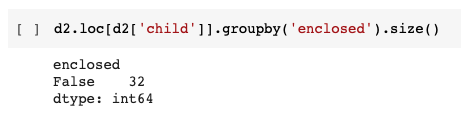
All false! That’s what we were expecting.
The first thing to be aware of when dealing with non-enclosed data is that unless we’re careful, we’ll double-count foot traffic. Foot traffic that shows up for a child will also show up for its parent. So we will want to drop one or the other if we’re going to be aggregating things up and don’t want to double-count.
How can we tell if we have double-counting going on? Well, it should be going on any time you have a non-enclosed child location. But it’s especially easy to see if the parent location doesn’t have any visitors outside of its children, as is the case here. We can add up the daily visits for the parent, and for all the children, and should get the exact same values.
| parent_visits | child_visits | |
|---|---|---|
| 0 | 25 | 25.0 |
| 1 | 28 | 28.0 |
| 2 | 28 | 28.0 |
| 3 | 54 | 54.0 |
| 4 | 77 | 77.0 |
| 5 | 55 | 55.0 |
| 6 | 54 | 54.0 |
| 7 | 58 | 58.0 |
| 8 | 29 | 29.0 |
| 9 | 30 | 30.0 |
| 10 | 67 | 67.0 |
| 11 | 73 | 73.0 |
| 12 | 61 | 61.0 |
| 13 | 55 | 55.0 |
| 14 | 58 | 58.0 |
| 15 | 33 | 33.0 |
| 16 | 22 | 22.0 |
| 17 | 43 | 43.0 |
| 18 | 83 | 83.0 |
| 19 | 51 | 51.0 |
| 20 | 50 | 50.0 |
| 21 | 66 | 66.0 |
| 22 | 50 | 50.0 |
| 23 | 25 | 25.0 |
| 24 | 56 | 56.0 |
| 25 | 58 | 58.0 |
| 26 | 62 | 62.0 |
| 27 | 53 | 53.0 |
| 28 | 65 | 65.0 |
| 29 | 36 | 36.0 |
| 30 | 21 | 21.0 |
They’re exactly the same! Clearly if we want to work with foot traffic data, we’ll need to only use one or the other.
Next we can ask how to deal with the spatial arrangement of our data. This time, we have data where each place of interest has its own polygon in the polygon_wkt column.
| polygon_wkt | |
|---|---|
| 56 | POLYGON ((-77.59417363840089 43.119868567405916, -77.59414413410173 43.119943943129186, -77.59391480523095 43.119885208807354, -77.5939416273211 43.11981472754674, -77.59417363840089 43.119868567405916)) |
| 59 | POLYGON ((-77.59143161215052 43.120892209242385, -77.5912596878754 43.120816922141515, -77.591356 43.120596, -77.591542 43.120639, -77.59143161215052 43.120892209242385)) |
| 97 | POLYGON ((-77.59414341246315 43.11994394312916, -77.59407635723778 43.120070221730195, -77.59401466643044 43.120098609906954, -77.593844346158 43.12004868586318, -77.59391274248787 43.119885208807375, -77.59414341246315 43.11994394312916)) |
| 153 | POLYGON ((-77.59200493412783 43.120714745000875, -77.59228924828341 43.12079207746439, -77.59237105565836 43.120632273247, -77.59284446554949 43.120730896725995, -77.59273985939791 43.12101428539153, -77.59253094468227 43.12150846710204, -77.59250412259212 43.12151042486173, -77.5924638894569 43.12157307313886, -77.59240219864955 43.121608312766554, -77.59197036299815 43.12150455158246, -77.5919971850883 43.12144777652045, -77.59196231637111 43.12144777652045, -77.59193549428096 43.12150259382258, -77.59167800221553 43.12143211442511, -77.59185502801051 43.121030771864206, -77.59177456174007 43.121015109662125, -77.59183088812938 43.120928967478925, -77.59188453230968 43.12094854525849, -77.59200493412783 43.120714745000875)) |
| 187 | POLYGON ((-77.5918583166116 43.120005479690604, -77.59162764663633 43.119952618856665, -77.59174566383298 43.11967656709296, -77.59197901601728 43.11972747034871, -77.5918583166116 43.120005479690604)) |
| 224 | POLYGON ((-77.59200493412783 43.120714745000875, -77.59228924828341 43.12079207746439, -77.59237105565836 43.120632273247, -77.59284446554949 43.120730896725995, -77.59273985939791 43.12101428539153, -77.59253094468227 43.12150846710204, -77.59250412259212 43.12151042486173, -77.5924638894569 43.12157307313886, -77.59240219864955 43.121608312766554, -77.59197036299815 43.12150455158246, -77.5919971850883 43.12144777652045, -77.59196231637111 43.12144777652045, -77.59193549428096 43.12150259382258, -77.59167800221553 43.12143211442511, -77.59185502801051 43.121030771864206, -77.59177456174007 43.121015109662125, -77.59183088812938 43.120928967478925, -77.59188453230968 43.12094854525849, -77.59200493412783 43.120714745000875)) |
| 227 | POLYGON ((-77.59164308521562 43.12040763170624, -77.59147215835709 43.120331919138046, -77.59159 43.120058, -77.591775 43.120101, -77.59164308521562 43.12040763170624)) |
| 229 | POLYGON ((-77.59423801141725 43.11974620402106, -77.59417363840089 43.11987052521808, -77.59394430953012 43.11981276973279, -77.59399124818788 43.1196972585986, -77.59423801141725 43.11974620402106)) |
| 283 | POLYGON ((-77.591946 43.121896, -77.591944 43.121862, -77.591803 43.121865, -77.591801 43.121798, -77.591748 43.121784, -77.591736 43.121808, -77.591592 43.12177, -77.591574 43.121808, -77.591446 43.121774, -77.591542 43.121581, -77.591813 43.121654, -77.591804 43.121671, -77.591936 43.121668, -77.591937 43.121699, -77.592063 43.121696, -77.592065 43.121762, -77.592282 43.121757, -77.592288 43.121889, -77.591946 43.121896)) |
Each POI having its own geometry is going to be the case whenever we have non-enclosed children, but keep in mind it will also sometimes be the case with enclosed children. Just be sure to look if it’s there!
When it comes to polygons in close proximity like this, sometimes we can be certain of how well we have the shape down, and other times we can’t. For this we’d want to look at the polygon_class column. Ideally we want this to be an OWNED_POLYGON indicating that we can map the location to a specific polygon. Otherwise, there might be a little uncertainty. What do we have here?
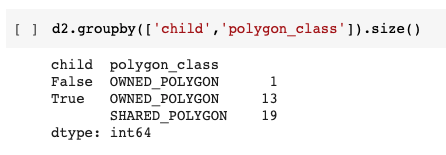
We have a single parent location that is an OWNED_POLYGON, as well as 13 children OWNED_POLYGONs. In addition, we have 19 children SHARED_POLYGONs, which means that multiple POIs have ended up sharing the same polygon – these POIs can’t be distinguished, or they may literally share the same space. More detail here.
As you might expect, the child polygons sit inside of the parent polygon. Using the same methods as before, this time we can actually get the internal structure of the location.
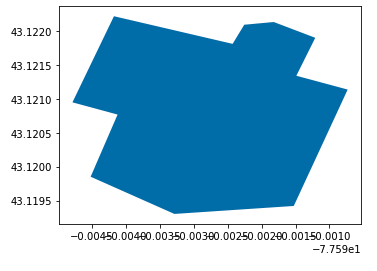
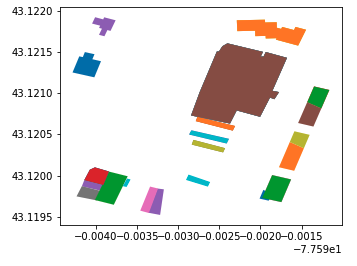
We can see the exact structure taken up by the children. It doesn’t fill the whole parent space! And yet, every single visit to the parent was accounted for by a child. What gives? Well, all that blank space is parking lot.
And while the parent location includes the parking lot…
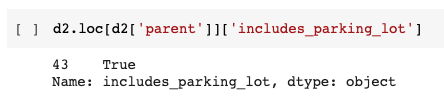
The children don’t…

And so what’s happening? SafeGraph is willing to count visits to parent POIs that aren’t to any children, and there are areas here that are part of the parent but not the children. But in this case we can see that we aren’t counting any visits from the parking lot to the parent POI (or perhaps there weren’t any, but that seems unlikely). Good to know!
Wrapping Up
So there we have it! Some reminders:
- Parent locations like malls and airports have children location inside of them
- Locations can include or exclude parking lots
- Children can be enclosed or non-enclosed
- Enclosed children don’t get their own foot traffic data
- Non-enclosed children do, and if you’re aggregating up you want to drop either the parents or the non-enclosed children or else you’ll double-count
- Some enclosed children don’t have their own polygons
- Some enclosed children, and all non-enclosed children, should have their own polygons
- The parent polygon can be bigger than the full list of its children, but sometimes this additional area doesn’t record visits (sometimes it does, though)